


Choosing the right web hosting solution is one of the most critical decisions you will make as a website owner. Your hosting choice directly impacts your website’s performance, reliability, security, scalability, and overall success. Whether you’re launching your first blog, running an e-commerce store, or managing a corporate website, understanding the differences between shared hosting, Virtual Private Server (VPS) hosting, and dedicated hosting is absolutely essential.
In today’s digital ecosystem, there are three primary hosting solutions available, each designed for different needs, budgets, and technical expertise levels. The wrong choice can lead to performance issues, security vulnerabilities, scalability problems, and unexpected costs. Conversely, the right choice can provide years of reliable, efficient service that grows with your business.
This comprehensive guide explores each hosting type in detail, comparing their features, costs, performance characteristics, and security implications. By the end of this guide, you will have a clear understanding of which hosting solution best fits your specific requirements and business goals.
Let’s begin by understanding the fundamental differences between these hosting types and what makes each one unique.
Understanding Web Hosting Fundamentals
Web hosting is a service that provides the technology and infrastructure necessary to make your website accessible on the internet. Hosting companies own and operate powerful servers that store your website files, databases, email accounts, and other digital assets. These servers are connected to the internet 24/7, ensuring your website is available to visitors whenever they want to access it.
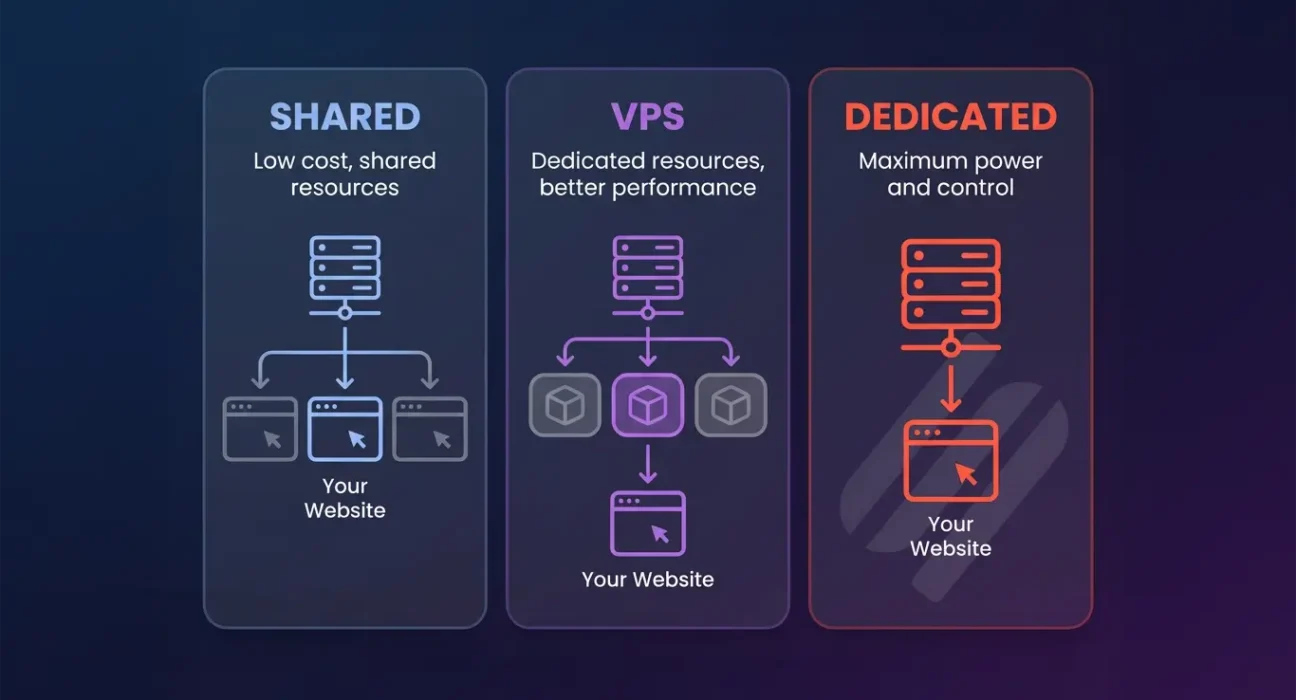
Think of web hosting like renting real estate. With shared hosting, you’re renting an apartment in a large building where multiple tenants share common spaces. With VPS hosting, you’re renting a private condo with your own dedicated utilities but sharing the building structure. With dedicated hosting, you’re purchasing an entire house exclusively for yourself, maintaining complete control over everything.
Understanding which metaphor applies to your situation will help you choose the right hosting solution. Let’s explore each hosting type in detail, starting with shared hosting, which serves the majority of websites on the internet.
Quick Comparison Table: Shared vs. VPS vs. Dedicated
| Feature | Shared Hosting | VPS Hosting | Dedicated Hosting |
|---|---|---|---|
| Monthly Cost | $2-15 | $20-150 | $100-500+ |
| Number of Sites | 100-500+ | 4-20 | Yours only |
| Resources | Shared | Allocated | Dedicated |
| Root Access | No | Yes | Yes |
| Uptime SLA | 95-99% | 99-99.5% | 99.5-99.9% |
| Ideal Traffic | <50K/month | 50K-500K/month | 500K+/month |
| Support Level | Comprehensive | Limited | Minimal |
| Technical Skill | Beginner | Intermediate | Advanced |
1. Shared Hosting: The Budget-Friendly Solution
What is Shared Hosting?
Shared hosting is the most economical and popular hosting option available today. In a shared hosting environment, hundreds or even thousands of websites coexist on a single physical server. All these websites share the server’s resources, including CPU processing power, RAM memory, disk storage space, and bandwidth. The hosting provider manages all server maintenance, security updates, software installations, and technical infrastructure.
Approximately 70% of all websites on the internet use shared hosting, making it the dominant hosting solution. This widespread adoption reflects the accessibility and affordability of shared hosting for website owners of all experience levels.
The affordability of shared hosting comes from this resource-sharing model. The hosting company distributes the cost of maintaining the physical server across hundreds of customers, making the monthly cost extremely low. For this reason, shared hosting is ideal for beginners who want to launch a website without significant financial investment.
Advantages of Shared Hosting
- Extremely Affordable: Pricing starts at just $2-5 per month, sometimes even lower with promotional offers
- Easy Setup: Most providers offer one-click WordPress installation and other popular applications
- No Technical Knowledge Required: The hosting provider handles all server management and maintenance
- Included Features: Email hosting, free SSL certificates, website builders, and automatic backups are typically included
- Excellent Support: 24/7 customer support from hosting provider experts
- Reliable Uptime: Modern shared hosting providers maintain 99% or higher uptime
Disadvantages of Shared Hosting
- Performance Issues: Other websites’ traffic can slow your site when they consume excessive resources
- Limited Resources: You cannot control how much CPU, RAM, or bandwidth you actually use
- Poor Scalability: As your website grows, shared hosting limits prevent expansion
- Security Risks: A hacked website on the same server can potentially affect your site
- No Root Access: You cannot install custom software or modify server configurations
- The Noisy Neighbor Problem: One problematic website can degrade performance for everyone
Best Use Cases for Shared Hosting
- Personal blogs and online portfolios
- Small business websites with minimal traffic
- Websites receiving less than 50,000 monthly visitors
- First-time website owners with limited budgets
- Learning projects and testing environments
2. VPS Hosting: The Flexible Middle Ground
What is VPS Hosting?
VPS stands for Virtual Private Server. VPS hosting takes a single physical server and divides it into multiple virtual servers using advanced virtualization technology. Each virtual server operates independently, with its own operating system, dedicated resources, and separate environment. While the virtual servers share the same physical hardware, they function as completely isolated systems.
This technology provides the perfect balance between the affordability of shared hosting and the power of dedicated hosting. VPS hosting is the fastest-growing hosting segment, with adoption increasing dramatically as businesses recognize its advantages.
You get guaranteed resources specifically allocated to your virtual server, complete administrative control, and significantly better performance than shared hosting, all at a fraction of the cost of a dedicated server. VPS hosting represents the optimal solution for many growing businesses.
Advantages of VPS Hosting
- Improved Performance: Guaranteed resources mean your site loads faster and handles more traffic
- Complete Isolation: Other users’ activities do not affect your website’s performance
- Full Root Access: Complete control to install software and configure your server
- Easy Scalability: Upgrade resources quickly as your website grows
- Better Security: Isolated environment reduces risks from other websites
- Reasonable Pricing: More affordable than dedicated while much more capable than shared
Disadvantages of VPS Hosting
- Technical Knowledge Required: You must understand Linux and server administration
- More Expensive: Monthly costs are 3-10 times higher than shared hosting
- Management Responsibility: You are responsible for security updates and maintenance
- Steep Learning Curve: Not suitable for complete beginners
- CPU Overallocation: Some providers oversell CPU resources across customers
Best Use Cases for VPS Hosting
- Growing businesses with 50,000-500,000 monthly visitors
- E-commerce sites with moderate transaction volumes
- Applications requiring specific software or programming environments
- Websites needing better performance than shared hosting
- Projects transitioning from shared to dedicated infrastructure
3. Dedicated Hosting: The Enterprise Solution
What is Dedicated Hosting?
Dedicated hosting provides an entire physical server exclusively for your website. All server resources, CPU cores, RAM memory, and storage capacity are devoted entirely to your use. You have complete control over the hardware, operating system, installed software, and every configuration. The hosting company provides the physical infrastructure, network connectivity, and basic support, but you maintain complete responsibility for managing the server.
Dedicated hosting represents the premium hosting solution, offering maximum performance, complete customization, and guaranteed resource availability. While dedicated hosting costs significantly more than other options, it provides unmatched power and reliability for demanding applications.
Dedicated hosting is the choice for enterprises, high-traffic websites, and mission-critical applications where performance and reliability are paramount.
Advantages of Dedicated Hosting
- Maximum Performance: All resources dedicated to your website means peak performance
- Ultimate Reliability: No other users means guaranteed consistent performance
- Complete Customization: Install any software and configure everything exactly as needed
- Enhanced Security: Implement custom security measures specific to your needs
- Unlimited Scalability: Expand resources without any artificial limitations
- High Uptime: Enterprise-class infrastructure ensuring 99.9% or higher uptime
Disadvantages of Dedicated Hosting
- Very Expensive: Monthly costs of $150-500+ are substantial
- Requires Advanced Technical Skills: System administration expertise is essential
- Full Management Responsibility: You must handle all security, updates, and maintenance
- Not Suitable for Small Sites: Overkill and wasteful for low-traffic websites
- Steep Learning Curve: Definitely not appropriate for beginners
Best Use Cases for Dedicated Hosting
- Large enterprises and major corporations
- High-traffic websites with 500,000+ monthly visitors
- E-commerce platforms processing millions of dollars in transactions
- Applications with intensive processing or resource requirements
- Mission-critical services requiring guaranteed uptime and performance
How to Choose the Right Hosting: Decision Framework
Critical Questions to Answer
- What is your monthly website traffic? Be realistic about current and projected traffic levels
- What technical skills do you possess? Can you manage servers, or do you need provider support?
- What is your budget? Determine realistic hosting costs you can sustain
- Does your website generate revenue? Consider hosting investment relative to income
- What specific software do you need? Some applications require root access
- How important is website performance? Better performance improves user experience and SEO
- What are your growth plans? Choose hosting that can scale with your business
- Do you handle sensitive customer data? More control requires dedicated or VPS hosting
Quick Selection Guide
Choose Shared Hosting if:
- You are completely new to website ownership
- Your budget is less than $10 per month
- Your website receives less than 50,000 monthly visitors
- Your website does not generate revenue
Choose VPS Hosting if:
- Your website receives 50,000-500,000 monthly visitors
- You have intermediate technical knowledge or can hire support
- You need specific software or configurations not available on shared hosting
- You can budget $20-150 per month for hosting
Choose Dedicated Hosting if:
- Your website receives over 500,000 monthly visitors
- You have advanced technical expertise or dedicated IT staff
- Your website handles significant transaction volumes or sensitive data
- You can budget $150-500+ per month for hosting
Important Additional Considerations
Uptime and Reliability
Uptime refers to the percentage of time your website remains online and accessible. Uptime percentages directly translate to downtime hours annually. An uptime of 99% allows 3.65 days of downtime per year. 99.5% allows 1.83 days. 99.9% allows only 8.76 hours. For any revenue-generating website, the difference between 99% and 99.9% uptime represents significant potential revenue loss.
Always review the Service Level Agreement (SLA) before choosing a hosting provider. The SLA specifies uptime guarantees and explains what compensation you receive if the provider fails to meet these commitments. Quality hosting providers guarantee higher uptime percentages and provide substantive compensation for downtime.
Security and Data Protection
Security responsibility varies dramatically across hosting types. With shared hosting, the provider handles most security measures at the server level, and you are responsible for application-level security. With VPS and dedicated hosting, you bear increasing responsibility for implementing and maintaining security measures.
Regardless of hosting type, ensure your provider offers SSL certificate support, regular backups, malware scanning, and DDoS protection. Additionally, you should implement strong passwords, keep your software updated, and maintain regular backups of your data.
If your website handles sensitive customer data or payment information, prioritize security heavily in your hosting selection. Dedicated or managed VPS hosting provides better security control for sensitive applications.
Scalability and Growth Potential
As your website grows, your hosting needs will evolve. Shared hosting has strict limits on scalability. Once you reach the ceiling of a shared plan, you must migrate to VPS or dedicated hosting. VPS hosting allows easier scaling through plan upgrades. Dedicated hosting offers unlimited vertical scalability through hardware upgrades.
Plan for growth when selecting hosting. Frequent migrations are disruptive and time-consuming. Choosing hosting with room to grow prevents unnecessary transitions as your business expands.
Customer Support Quality
Quality customer support becomes increasingly important as your website grows. Shared hosting typically includes excellent support with 24/7 availability. VPS hosting support varies between providers. Dedicated hosting often includes minimal support, assuming customers have in-house expertise.
Before selecting a hosting provider, test their support system. Submit a question and observe response time and quality. Read customer reviews specifically mentioning support experience. For mission-critical websites, superior support quality is worth paying more.
Migration and Long-Term Cost Considerations
Website migration is the process of moving your website from one hosting provider to another. Migrations require careful planning to minimize downtime. Most modern hosting providers offer automated migration tools or provide free migration services. A typical migration can be completed within hours to days, depending on website complexity and size.
Consider long-term costs when evaluating hosting options. Shared hosting may seem inexpensive, but if performance issues cause you to lose customers or require frequent migrations, true costs escalate significantly. A small additional monthly investment in better hosting may provide substantially higher returns through improved performance and customer satisfaction.
Calculate total cost of ownership, including not just hosting fees but also domain registration, SSL certificates, email hosting, backup services, and any technical support or administration labor required. The cheapest hosting is not always the most economical solution over time.
Conclusion
Choosing between shared, VPS, and dedicated hosting is one of the most important decisions you will make as a website owner. Each hosting type serves different needs and budgets, and there is no universally correct answer. The right choice depends entirely on your specific situation, requirements, and goals.
Shared hosting provides an excellent starting point for newcomers and small websites with tight budgets. It offers simplicity, affordability, and excellent support, making it ideal for those beginning their online journey.
VPS hosting offers the optimal balance between cost and capability for growing businesses. It provides better performance and control than shared hosting while remaining significantly more affordable than dedicated hosting.
Dedicated hosting provides maximum performance and control for enterprises and high-traffic websites where hosting investment is justified by business requirements and revenue generation.
Most successful websites begin with shared hosting and graduate to more powerful solutions as traffic and requirements grow. This evolutionary approach allows you to start affordably while maintaining flexibility to upgrade as needed.
Use the framework and guidance provided in this article to evaluate your specific situation and make an informed decision. Take time to research hosting providers, read customer reviews, test support quality, and understand pricing structures. Your hosting choice is an investment in your website’s success and should receive careful consideration.
Frequently Asked Questions (20 FAQs)
Below are the most common questions about web hosting, with detailed answers to help clarify your decision.
1. Can I upgrade from shared hosting to VPS or dedicated hosting later?
Absolutely yes! This is one of the primary advantages of starting with shared hosting. As your website grows and your needs evolve, you can upgrade to VPS or dedicated hosting. Most hosting providers offer migration assistance to transfer your website with minimal downtime. Many providers offer free migrations for customers upgrading their plans. This flexibility allows you to start affordably and scale as your business grows.
2. What happens if a hacked website on my shared host affects my site?
While this is a potential risk, quality hosting providers implement isolation measures to minimize the impact. Modern shared hosting environments use containerization and file system isolation to prevent cross-site compromises. However, your data is generally safe even if another site on the same server is hacked. To mitigate risk, choose hosting providers with strong security reputations, keep your website software updated, use strong passwords, and maintain regular backups. Reputable providers have incident response procedures if security issues occur.
3. Is VPS hosting suitable for e-commerce websites?
VPS hosting works well for e-commerce sites processing moderate transaction volumes. Many successful online stores run on VPS hosting. However, if you process extremely high transaction volumes, experience significant seasonal traffic spikes, or handle large amounts of sensitive payment data, dedicated hosting may be more appropriate. For small-to-medium e-commerce sites, VPS hosting provides excellent performance and security at reasonable cost. Always ensure your payment processing integrates with secure SSL certificates and PCI-DSS compliance measures.
4. Do I need advanced technical knowledge to use VPS hosting?
While Linux knowledge is helpful, it is not absolutely required. Managed VPS hosting, where the provider handles server management while you retain administrative access, bridges this gap. Control panels like cPanel or Plesk make server management significantly easier without requiring deep Linux command-line expertise. Many hosting providers offer tutorials and support to help customers manage their VPS instances. If you lack technical expertise, consider managed VPS hosting which includes provider support for server administration tasks.
5. What is the noisy neighbor problem in shared hosting?
The noisy neighbor problem occurs when one website on a shared server consumes excessive resources, degrading performance for all other websites on that server. For example, if one site experiences a traffic spike or has inefficient code consuming CPU resources, other sites on the same server experience slowdowns. Because all websites share the same CPU, RAM, and bandwidth, one problematic site can negatively impact everyone. Quality hosting providers implement resource management and monitoring to minimize this issue, but it remains an inherent limitation of shared hosting.
6. What does root access mean, and why is it important?
Root access is administrative access to your server. With root access, you can install custom software, modify system configurations, create user accounts, manage permissions, and have complete control over your server environment. Shared hosting does not provide root access, limiting your ability to customize the environment. VPS and dedicated hosting both provide root access, allowing full customization. If you need to run specific applications or implement custom configurations, root access is essential. If you use standard websites or applications, root access may not be necessary.
7. How much downtime costs a business varies, but what should I expect?
Downtime costs vary dramatically by business type. For e-commerce sites, downtime directly translates to lost transactions and revenue. A site processing $10,000 daily in revenue loses approximately $6.94 per minute of downtime. A service-based business loses customer confidence and credibility. A SaaS application experiences subscription cancellations and customer churn. Even a blog loses traffic and search engine rankings during extended downtime. For any revenue-generating site, the cost of downtime typically far exceeds the cost difference between hosting tiers. This underscores the importance of selecting reliable hosting with high uptime guarantees.
8. How difficult is it to migrate my website to a different hosting provider?
Website migration is achievable, though it requires careful planning. Most modern hosting providers offer migration tools or provide free migration services. For typical websites, migration can be completed within hours to a couple of days. The process involves copying website files, exporting and importing databases, updating DNS settings, and verifying the site functions correctly on new servers. Potential downtime ranges from minutes to hours depending on how quickly DNS propagates globally. Experienced hosting providers can minimize downtime through careful planning. If your website is critical to your business, schedule migration during low-traffic periods.
9. What is bandwidth, and how much do I actually need?
Bandwidth is the amount of data transferred between your server and website visitors. If your website averages 2MB per page view and you have 1,000 monthly visitors, you need approximately 2GB of bandwidth monthly. Most shared hosting plans provide 100GB to unlimited bandwidth, which is sufficient for small-to-medium websites. Heavy video streaming sites require significantly more bandwidth. To calculate your needs, monitor your actual website traffic and data transfer. Most hosting control panels display bandwidth usage, allowing you to right-size your plan accordingly.
10. How important are backup policies, and what should I expect?
Backup policies are crucial for protecting your data. A good backup policy includes regular automated backups (daily is ideal) with retention periods of at least 30 days. Backups protect against data loss from hacking, human error, hardware failure, and malware. Shared hosting typically includes automatic backups managed by the provider. VPS and dedicated hosting often require you to implement backups yourself. Regardless of hosting type, maintain regular backups and verify you can restore from them if needed. Never rely entirely on provider backups without personal verification.
11. What do uptime percentages actually mean in terms of downtime hours?
Uptime percentages translate directly to allowed downtime. 99% uptime allows 3.65 days of downtime annually. 99.5% uptime allows 1.83 days. 99.9% uptime allows only 8.76 hours. 99.99% uptime allows only 52 minutes. For revenue-generating websites, the difference between 99% and 99.9% uptime represents significant potential revenue loss. Shared hosting typically guarantees 95-99% uptime. VPS hosting typically guarantees 99-99.5%. Dedicated hosting typically guarantees 99.9-99.99%. Always review the Service Level Agreement to understand specific uptime guarantees and compensation for failures.
12. Should I choose managed or unmanaged hosting for my VPS?
Managed VPS includes the provider handling server updates, security patches, backups, and monitoring, costing approximately 30-50% more than unmanaged. Unmanaged VPS requires you to handle all administration, saving money but requiring technical expertise. For users lacking Linux expertise, managed VPS is the better choice. It saves time and prevents costly mistakes. For technical users wanting full control and lower costs, unmanaged VPS is appropriate. Some providers offer middle-ground options with partial management, allowing customization of which tasks you handle versus outsource.
13. What is an SLA, and why should I pay attention to it?
An SLA (Service Level Agreement) is a contract outlining a provider’s uptime guarantees, support response times, and compensation if they fail to meet commitments. A detailed SLA with specific commitments indicates a responsible provider. Some SLAs offer service credits or refunds if they miss uptime targets. Always read the SLA carefully before committing to a hosting provider. Avoid providers with vague SLAs or no written agreements. An SLA with clear, measurable commitments protects you and gives you recourse if service quality is inadequate.
14. Can I host multiple websites on a single hosting account?
Yes, most shared hosting plans allow multiple websites on one account. Check the provider’s policy for the number of websites allowed. Resources are still shared across all sites, so multiple sites on one account share bandwidth and processing power. VPS and dedicated hosting also support multiple websites, with better resource isolation. For many people, hosting multiple sites on one account is more economical than purchasing separate accounts. However, ensure resource limits are sufficient for all your sites combined.
15. What is virtualization technology used in VPS hosting?
Virtualization is the technology that divides one physical server into multiple virtual servers. Hypervisors (software like KVM, Xen, Hyper-V, or OpenVZ) manage these virtual instances. Each VPS runs its own operating system and applications independently, though they share the same physical hardware. Virtualization provides isolation, allowing one VPS to be hacked without affecting others. Different hypervisor technologies have different performance characteristics and isolation levels. KVM is widely used and provides excellent performance and isolation. Understanding your provider’s virtualization technology helps assess performance and reliability.
16. What are DNS records, and why do they matter for hosting?
DNS records tell the internet where to find your website. When you change hosting providers, you update DNS records to point to your new host’s servers. DNS propagation, the process of DNS changes spreading globally, takes 24-48 hours. During migration, your site may be temporarily unreachable if DNS is not configured correctly. Most hosting providers provide clear instructions for DNS configuration. Some providers offer automatic DNS migration. Understanding DNS is important when changing hosts to minimize migration issues and downtime.
17. What hosting is recommended for WordPress websites?
WordPress runs on any hosting type, but shared hosting is most popular for beginners. Most shared hosts offer one-click WordPress installation with optimal default configurations. For small to medium blogs, shared hosting is sufficient. As traffic grows beyond 100,000 monthly visitors, consider VPS for better performance and reliability. WordPress-optimized managed hosting is available, with providers fine-tuning performance specifically for WordPress. For enterprise WordPress sites, dedicated hosting provides maximum performance and control. Choose hosting based on your specific traffic and performance requirements.
18. How do I choose between multiple hosting providers offering similar plans?
Compare providers based on: price (including renewal rates, not just introductory pricing), uptime guarantees with clear SLAs, customer reviews on independent sites, support quality and availability, included features like SSL and backups, and money-back guarantees. Test support quality by submitting questions and observing response time and helpfulness. Check reviews specifically mentioning support experience and uptime reliability. Do not choose solely based on price. The slightly more expensive host with excellent support and reliability is often the better long-term value than the cheapest option with poor support.
19. What is the difference between managed and unmanaged dedicated hosting?
Managed dedicated hosting includes the provider handling server security, software updates, monitoring, backups, and maintenance, costing significantly more ($300-500+ monthly). Unmanaged dedicated hosting provides only the hardware and connectivity, with you handling everything, costing less but requiring advanced expertise. Managed is better for organizations lacking Linux expertise or wanting to focus on business rather than infrastructure. Unmanaged suits experienced system administrators who want complete control and lower costs. Some providers offer hybrid managed options, allowing you to choose which tasks the provider handles.
20. Should I worry about security with shared hosting for my business website?
Shared hosting security is reasonable for most small business websites. Reputable providers implement robust isolation measures, regular security updates, firewalls, and malware scanning. However, for business websites handling customer data or payment information, VPS or dedicated hosting offers better isolation and security control. The additional control over security configuration and customization available with VPS/dedicated hosting justifies the higher cost for sensitive applications. Regardless of hosting type, implement your own security measures: strong passwords, SSL certificates, software updates, and regular backups. Security is always a shared responsibility between provider and customer.
Choosing the right web hosting solution is one of the most critical decisions you will make as a website owner. Your hosting choice directly impacts your website’s performance, reliability, security, scalability, and overall success. Whether you’re launching your first blog, running an e-commerce store, or managing a corporate website, understanding the differences between shared hosting, Virtual Private Server (VPS) hosting, and dedicated hosting is absolutely essential.
In today’s digital ecosystem, there are three primary hosting solutions available, each designed for different needs, budgets, and technical expertise levels. The wrong choice can lead to performance issues, security vulnerabilities, scalability problems, and unexpected costs. Conversely, the right choice can provide years of reliable, efficient service that grows with your business.
This comprehensive guide explores each hosting type in detail, comparing their features, costs, performance characteristics, and security implications. By the end of this guide, you will have a clear understanding of which hosting solution best fits your specific requirements and business goals.
Let’s begin by understanding the fundamental differences between these hosting types and what makes each one unique.
Understanding Web Hosting Fundamentals
Web hosting is a service that provides the technology and infrastructure necessary to make your website accessible on the internet. Hosting companies own and operate powerful servers that store your website files, databases, email accounts, and other digital assets. These servers are connected to the internet 24/7, ensuring your website is available to visitors whenever they want to access it.
Think of web hosting like renting real estate. With shared hosting, you’re renting an apartment in a large building where multiple tenants share common spaces. With VPS hosting, you’re renting a private condo with your own dedicated utilities but sharing the building structure. With dedicated hosting, you’re purchasing an entire house exclusively for yourself, maintaining complete control over everything.
Understanding which metaphor applies to your situation will help you choose the right hosting solution. Let’s explore each hosting type in detail, starting with shared hosting, which serves the majority of websites on the internet.
Quick Comparison Table: Shared vs. VPS vs. Dedicated
| Feature | Shared Hosting | VPS Hosting | Dedicated Hosting |
|---|---|---|---|
| Monthly Cost | $2-15 | $20-150 | $100-500+ |
| Number of Sites | 100-500+ | 4-20 | Yours only |
| Resources | Shared | Allocated | Dedicated |
| Root Access | No | Yes | Yes |
| Uptime SLA | 95-99% | 99-99.5% | 99.5-99.9% |
| Ideal Traffic | <50K/month | 50K-500K/month | 500K+/month |
| Support Level | Comprehensive | Limited | Minimal |
| Technical Skill | Beginner | Intermediate | Advanced |
1. Shared Hosting: The Budget-Friendly Solution
What is Shared Hosting?
Shared hosting is the most economical and popular hosting option available today. In a shared hosting environment, hundreds or even thousands of websites coexist on a single physical server. All these websites share the server’s resources, including CPU processing power, RAM memory, disk storage space, and bandwidth. The hosting provider manages all server maintenance, security updates, software installations, and technical infrastructure.
Approximately 70% of all websites on the internet use shared hosting, making it the dominant hosting solution. This widespread adoption reflects the accessibility and affordability of shared hosting for website owners of all experience levels.
The affordability of shared hosting comes from this resource-sharing model. The hosting company distributes the cost of maintaining the physical server across hundreds of customers, making the monthly cost extremely low. For this reason, shared hosting is ideal for beginners who want to launch a website without significant financial investment.
Advantages of Shared Hosting
- Extremely Affordable: Pricing starts at just $2-5 per month, sometimes even lower with promotional offers
- Easy Setup: Most providers offer one-click WordPress installation and other popular applications
- No Technical Knowledge Required: The hosting provider handles all server management and maintenance
- Included Features: Email hosting, free SSL certificates, website builders, and automatic backups are typically included
- Excellent Support: 24/7 customer support from hosting provider experts
- Reliable Uptime: Modern shared hosting providers maintain 99% or higher uptime
Disadvantages of Shared Hosting
- Performance Issues: Other websites’ traffic can slow your site when they consume excessive resources
- Limited Resources: You cannot control how much CPU, RAM, or bandwidth you actually use
- Poor Scalability: As your website grows, shared hosting limits prevent expansion
- Security Risks: A hacked website on the same server can potentially affect your site
- No Root Access: You cannot install custom software or modify server configurations
- The Noisy Neighbor Problem: One problematic website can degrade performance for everyone
Best Use Cases for Shared Hosting
- Personal blogs and online portfolios
- Small business websites with minimal traffic
- Websites receiving less than 50,000 monthly visitors
- First-time website owners with limited budgets
- Learning projects and testing environments
2. VPS Hosting: The Flexible Middle Ground
What is VPS Hosting?
VPS stands for Virtual Private Server. VPS hosting takes a single physical server and divides it into multiple virtual servers using advanced virtualization technology. Each virtual server operates independently, with its own operating system, dedicated resources, and separate environment. While the virtual servers share the same physical hardware, they function as completely isolated systems.
This technology provides the perfect balance between the affordability of shared hosting and the power of dedicated hosting. VPS hosting is the fastest-growing hosting segment, with adoption increasing dramatically as businesses recognize its advantages.
You get guaranteed resources specifically allocated to your virtual server, complete administrative control, and significantly better performance than shared hosting, all at a fraction of the cost of a dedicated server. VPS hosting represents the optimal solution for many growing businesses.
Advantages of VPS Hosting
- Improved Performance: Guaranteed resources mean your site loads faster and handles more traffic
- Complete Isolation: Other users’ activities do not affect your website’s performance
- Full Root Access: Complete control to install software and configure your server
- Easy Scalability: Upgrade resources quickly as your website grows
- Better Security: Isolated environment reduces risks from other websites
- Reasonable Pricing: More affordable than dedicated while much more capable than shared
Disadvantages of VPS Hosting
- Technical Knowledge Required: You must understand Linux and server administration
- More Expensive: Monthly costs are 3-10 times higher than shared hosting
- Management Responsibility: You are responsible for security updates and maintenance
- Steep Learning Curve: Not suitable for complete beginners
- CPU Overallocation: Some providers oversell CPU resources across customers
Best Use Cases for VPS Hosting
- Growing businesses with 50,000-500,000 monthly visitors
- E-commerce sites with moderate transaction volumes
- Applications requiring specific software or programming environments
- Websites needing better performance than shared hosting
- Projects transitioning from shared to dedicated infrastructure
3. Dedicated Hosting: The Enterprise Solution
What is Dedicated Hosting?
Dedicated hosting provides an entire physical server exclusively for your website. All server resources, CPU cores, RAM memory, and storage capacity are devoted entirely to your use. You have complete control over the hardware, operating system, installed software, and every configuration. The hosting company provides the physical infrastructure, network connectivity, and basic support, but you maintain complete responsibility for managing the server.
Dedicated hosting represents the premium hosting solution, offering maximum performance, complete customization, and guaranteed resource availability. While dedicated hosting costs significantly more than other options, it provides unmatched power and reliability for demanding applications.
Dedicated hosting is the choice for enterprises, high-traffic websites, and mission-critical applications where performance and reliability are paramount.
Advantages of Dedicated Hosting
- Maximum Performance: All resources dedicated to your website means peak performance
- Ultimate Reliability: No other users means guaranteed consistent performance
- Complete Customization: Install any software and configure everything exactly as needed
- Enhanced Security: Implement custom security measures specific to your needs
- Unlimited Scalability: Expand resources without any artificial limitations
- High Uptime: Enterprise-class infrastructure ensuring 99.9% or higher uptime
Disadvantages of Dedicated Hosting
- Very Expensive: Monthly costs of $150-500+ are substantial
- Requires Advanced Technical Skills: System administration expertise is essential
- Full Management Responsibility: You must handle all security, updates, and maintenance
- Not Suitable for Small Sites: Overkill and wasteful for low-traffic websites
- Steep Learning Curve: Definitely not appropriate for beginners
Best Use Cases for Dedicated Hosting
- Large enterprises and major corporations
- High-traffic websites with 500,000+ monthly visitors
- E-commerce platforms processing millions of dollars in transactions
- Applications with intensive processing or resource requirements
- Mission-critical services requiring guaranteed uptime and performance
How to Choose the Right Hosting: Decision Framework
Critical Questions to Answer
- What is your monthly website traffic? Be realistic about current and projected traffic levels
- What technical skills do you possess? Can you manage servers, or do you need provider support?
- What is your budget? Determine realistic hosting costs you can sustain
- Does your website generate revenue? Consider hosting investment relative to income
- What specific software do you need? Some applications require root access
- How important is website performance? Better performance improves user experience and SEO
- What are your growth plans? Choose hosting that can scale with your business
- Do you handle sensitive customer data? More control requires dedicated or VPS hosting
Quick Selection Guide
Choose Shared Hosting if:
- You are completely new to website ownership
- Your budget is less than $10 per month
- Your website receives less than 50,000 monthly visitors
- Your website does not generate revenue
Choose VPS Hosting if:
- Your website receives 50,000-500,000 monthly visitors
- You have intermediate technical knowledge or can hire support
- You need specific software or configurations not available on shared hosting
- You can budget $20-150 per month for hosting
Choose Dedicated Hosting if:
- Your website receives over 500,000 monthly visitors
- You have advanced technical expertise or dedicated IT staff
- Your website handles significant transaction volumes or sensitive data
- You can budget $150-500+ per month for hosting
Important Additional Considerations
Uptime and Reliability
Uptime refers to the percentage of time your website remains online and accessible. Uptime percentages directly translate to downtime hours annually. An uptime of 99% allows 3.65 days of downtime per year. 99.5% allows 1.83 days. 99.9% allows only 8.76 hours. For any revenue-generating website, the difference between 99% and 99.9% uptime represents significant potential revenue loss.
Always review the Service Level Agreement (SLA) before choosing a hosting provider. The SLA specifies uptime guarantees and explains what compensation you receive if the provider fails to meet these commitments. Quality hosting providers guarantee higher uptime percentages and provide substantive compensation for downtime.
Security and Data Protection
Security responsibility varies dramatically across hosting types. With shared hosting, the provider handles most security measures at the server level, and you are responsible for application-level security. With VPS and dedicated hosting, you bear increasing responsibility for implementing and maintaining security measures.
Regardless of hosting type, ensure your provider offers SSL certificate support, regular backups, malware scanning, and DDoS protection. Additionally, you should implement strong passwords, keep your software updated, and maintain regular backups of your data.
If your website handles sensitive customer data or payment information, prioritize security heavily in your hosting selection. Dedicated or managed VPS hosting provides better security control for sensitive applications.
Scalability and Growth Potential
As your website grows, your hosting needs will evolve. Shared hosting has strict limits on scalability. Once you reach the ceiling of a shared plan, you must migrate to VPS or dedicated hosting. VPS hosting allows easier scaling through plan upgrades. Dedicated hosting offers unlimited vertical scalability through hardware upgrades.
Plan for growth when selecting hosting. Frequent migrations are disruptive and time-consuming. Choosing hosting with room to grow prevents unnecessary transitions as your business expands.
Customer Support Quality
Quality customer support becomes increasingly important as your website grows. Shared hosting typically includes excellent support with 24/7 availability. VPS hosting support varies between providers. Dedicated hosting often includes minimal support, assuming customers have in-house expertise.
Before selecting a hosting provider, test their support system. Submit a question and observe response time and quality. Read customer reviews specifically mentioning support experience. For mission-critical websites, superior support quality is worth paying more.
Migration and Long-Term Cost Considerations
Website migration is the process of moving your website from one hosting provider to another. Migrations require careful planning to minimize downtime. Most modern hosting providers offer automated migration tools or provide free migration services. A typical migration can be completed within hours to days, depending on website complexity and size.
Consider long-term costs when evaluating hosting options. Shared hosting may seem inexpensive, but if performance issues cause you to lose customers or require frequent migrations, true costs escalate significantly. A small additional monthly investment in better hosting may provide substantially higher returns through improved performance and customer satisfaction.
Calculate total cost of ownership, including not just hosting fees but also domain registration, SSL certificates, email hosting, backup services, and any technical support or administration labor required. The cheapest hosting is not always the most economical solution over time.
Conclusion
Choosing between shared, VPS, and dedicated hosting is one of the most important decisions you will make as a website owner. Each hosting type serves different needs and budgets, and there is no universally correct answer. The right choice depends entirely on your specific situation, requirements, and goals.
Shared hosting provides an excellent starting point for newcomers and small websites with tight budgets. It offers simplicity, affordability, and excellent support, making it ideal for those beginning their online journey.
VPS hosting offers the optimal balance between cost and capability for growing businesses. It provides better performance and control than shared hosting while remaining significantly more affordable than dedicated hosting.
Dedicated hosting provides maximum performance and control for enterprises and high-traffic websites where hosting investment is justified by business requirements and revenue generation.
Most successful websites begin with shared hosting and graduate to more powerful solutions as traffic and requirements grow. This evolutionary approach allows you to start affordably while maintaining flexibility to upgrade as needed.
Use the framework and guidance provided in this article to evaluate your specific situation and make an informed decision. Take time to research hosting providers, read customer reviews, test support quality, and understand pricing structures. Your hosting choice is an investment in your website’s success and should receive careful consideration.
Frequently Asked Questions (20 FAQs)
Below are the most common questions about web hosting, with detailed answers to help clarify your decision.
1. Can I upgrade from shared hosting to VPS or dedicated hosting later?
Absolutely yes! This is one of the primary advantages of starting with shared hosting. As your website grows and your needs evolve, you can upgrade to VPS or dedicated hosting. Most hosting providers offer migration assistance to transfer your website with minimal downtime. Many providers offer free migrations for customers upgrading their plans. This flexibility allows you to start affordably and scale as your business grows.
2. What happens if a hacked website on my shared host affects my site?
While this is a potential risk, quality hosting providers implement isolation measures to minimize the impact. Modern shared hosting environments use containerization and file system isolation to prevent cross-site compromises. However, your data is generally safe even if another site on the same server is hacked. To mitigate risk, choose hosting providers with strong security reputations, keep your website software updated, use strong passwords, and maintain regular backups. Reputable providers have incident response procedures if security issues occur.
3. Is VPS hosting suitable for e-commerce websites?
VPS hosting works well for e-commerce sites processing moderate transaction volumes. Many successful online stores run on VPS hosting. However, if you process extremely high transaction volumes, experience significant seasonal traffic spikes, or handle large amounts of sensitive payment data, dedicated hosting may be more appropriate. For small-to-medium e-commerce sites, VPS hosting provides excellent performance and security at reasonable cost. Always ensure your payment processing integrates with secure SSL certificates and PCI-DSS compliance measures.
4. Do I need advanced technical knowledge to use VPS hosting?
While Linux knowledge is helpful, it is not absolutely required. Managed VPS hosting, where the provider handles server management while you retain administrative access, bridges this gap. Control panels like cPanel or Plesk make server management significantly easier without requiring deep Linux command-line expertise. Many hosting providers offer tutorials and support to help customers manage their VPS instances. If you lack technical expertise, consider managed VPS hosting which includes provider support for server administration tasks.
5. What is the noisy neighbor problem in shared hosting?
The noisy neighbor problem occurs when one website on a shared server consumes excessive resources, degrading performance for all other websites on that server. For example, if one site experiences a traffic spike or has inefficient code consuming CPU resources, other sites on the same server experience slowdowns. Because all websites share the same CPU, RAM, and bandwidth, one problematic site can negatively impact everyone. Quality hosting providers implement resource management and monitoring to minimize this issue, but it remains an inherent limitation of shared hosting.
6. What does root access mean, and why is it important?
Root access is administrative access to your server. With root access, you can install custom software, modify system configurations, create user accounts, manage permissions, and have complete control over your server environment. Shared hosting does not provide root access, limiting your ability to customize the environment. VPS and dedicated hosting both provide root access, allowing full customization. If you need to run specific applications or implement custom configurations, root access is essential. If you use standard websites or applications, root access may not be necessary.
7. How much downtime costs a business varies, but what should I expect?
Downtime costs vary dramatically by business type. For e-commerce sites, downtime directly translates to lost transactions and revenue. A site processing $10,000 daily in revenue loses approximately $6.94 per minute of downtime. A service-based business loses customer confidence and credibility. A SaaS application experiences subscription cancellations and customer churn. Even a blog loses traffic and search engine rankings during extended downtime. For any revenue-generating site, the cost of downtime typically far exceeds the cost difference between hosting tiers. This underscores the importance of selecting reliable hosting with high uptime guarantees.
8. How difficult is it to migrate my website to a different hosting provider?
Website migration is achievable, though it requires careful planning. Most modern hosting providers offer migration tools or provide free migration services. For typical websites, migration can be completed within hours to a couple of days. The process involves copying website files, exporting and importing databases, updating DNS settings, and verifying the site functions correctly on new servers. Potential downtime ranges from minutes to hours depending on how quickly DNS propagates globally. Experienced hosting providers can minimize downtime through careful planning. If your website is critical to your business, schedule migration during low-traffic periods.
9. What is bandwidth, and how much do I actually need?
Bandwidth is the amount of data transferred between your server and website visitors. If your website averages 2MB per page view and you have 1,000 monthly visitors, you need approximately 2GB of bandwidth monthly. Most shared hosting plans provide 100GB to unlimited bandwidth, which is sufficient for small-to-medium websites. Heavy video streaming sites require significantly more bandwidth. To calculate your needs, monitor your actual website traffic and data transfer. Most hosting control panels display bandwidth usage, allowing you to right-size your plan accordingly.
10. How important are backup policies, and what should I expect?
Backup policies are crucial for protecting your data. A good backup policy includes regular automated backups (daily is ideal) with retention periods of at least 30 days. Backups protect against data loss from hacking, human error, hardware failure, and malware. Shared hosting typically includes automatic backups managed by the provider. VPS and dedicated hosting often require you to implement backups yourself. Regardless of hosting type, maintain regular backups and verify you can restore from them if needed. Never rely entirely on provider backups without personal verification.
11. What do uptime percentages actually mean in terms of downtime hours?
Uptime percentages translate directly to allowed downtime. 99% uptime allows 3.65 days of downtime annually. 99.5% uptime allows 1.83 days. 99.9% uptime allows only 8.76 hours. 99.99% uptime allows only 52 minutes. For revenue-generating websites, the difference between 99% and 99.9% uptime represents significant potential revenue loss. Shared hosting typically guarantees 95-99% uptime. VPS hosting typically guarantees 99-99.5%. Dedicated hosting typically guarantees 99.9-99.99%. Always review the Service Level Agreement to understand specific uptime guarantees and compensation for failures.
12. Should I choose managed or unmanaged hosting for my VPS?
Managed VPS includes the provider handling server updates, security patches, backups, and monitoring, costing approximately 30-50% more than unmanaged. Unmanaged VPS requires you to handle all administration, saving money but requiring technical expertise. For users lacking Linux expertise, managed VPS is the better choice. It saves time and prevents costly mistakes. For technical users wanting full control and lower costs, unmanaged VPS is appropriate. Some providers offer middle-ground options with partial management, allowing customization of which tasks you handle versus outsource.
13. What is an SLA, and why should I pay attention to it?
An SLA (Service Level Agreement) is a contract outlining a provider’s uptime guarantees, support response times, and compensation if they fail to meet commitments. A detailed SLA with specific commitments indicates a responsible provider. Some SLAs offer service credits or refunds if they miss uptime targets. Always read the SLA carefully before committing to a hosting provider. Avoid providers with vague SLAs or no written agreements. An SLA with clear, measurable commitments protects you and gives you recourse if service quality is inadequate.
14. Can I host multiple websites on a single hosting account?
Yes, most shared hosting plans allow multiple websites on one account. Check the provider’s policy for the number of websites allowed. Resources are still shared across all sites, so multiple sites on one account share bandwidth and processing power. VPS and dedicated hosting also support multiple websites, with better resource isolation. For many people, hosting multiple sites on one account is more economical than purchasing separate accounts. However, ensure resource limits are sufficient for all your sites combined.
15. What is virtualization technology used in VPS hosting?
Virtualization is the technology that divides one physical server into multiple virtual servers. Hypervisors (software like KVM, Xen, Hyper-V, or OpenVZ) manage these virtual instances. Each VPS runs its own operating system and applications independently, though they share the same physical hardware. Virtualization provides isolation, allowing one VPS to be hacked without affecting others. Different hypervisor technologies have different performance characteristics and isolation levels. KVM is widely used and provides excellent performance and isolation. Understanding your provider’s virtualization technology helps assess performance and reliability.
16. What are DNS records, and why do they matter for hosting?
DNS records tell the internet where to find your website. When you change hosting providers, you update DNS records to point to your new host’s servers. DNS propagation, the process of DNS changes spreading globally, takes 24-48 hours. During migration, your site may be temporarily unreachable if DNS is not configured correctly. Most hosting providers provide clear instructions for DNS configuration. Some providers offer automatic DNS migration. Understanding DNS is important when changing hosts to minimize migration issues and downtime.
17. What hosting is recommended for WordPress websites?
WordPress runs on any hosting type, but shared hosting is most popular for beginners. Most shared hosts offer one-click WordPress installation with optimal default configurations. For small to medium blogs, shared hosting is sufficient. As traffic grows beyond 100,000 monthly visitors, consider VPS for better performance and reliability. WordPress-optimized managed hosting is available, with providers fine-tuning performance specifically for WordPress. For enterprise WordPress sites, dedicated hosting provides maximum performance and control. Choose hosting based on your specific traffic and performance requirements.
18. How do I choose between multiple hosting providers offering similar plans?
Compare providers based on: price (including renewal rates, not just introductory pricing), uptime guarantees with clear SLAs, customer reviews on independent sites, support quality and availability, included features like SSL and backups, and money-back guarantees. Test support quality by submitting questions and observing response time and helpfulness. Check reviews specifically mentioning support experience and uptime reliability. Do not choose solely based on price. The slightly more expensive host with excellent support and reliability is often the better long-term value than the cheapest option with poor support.
19. What is the difference between managed and unmanaged dedicated hosting?
Managed dedicated hosting includes the provider handling server security, software updates, monitoring, backups, and maintenance, costing significantly more ($300-500+ monthly). Unmanaged dedicated hosting provides only the hardware and connectivity, with you handling everything, costing less but requiring advanced expertise. Managed is better for organizations lacking Linux expertise or wanting to focus on business rather than infrastructure. Unmanaged suits experienced system administrators who want complete control and lower costs. Some providers offer hybrid managed options, allowing you to choose which tasks the provider handles.
20. Should I worry about security with shared hosting for my business website?
Shared hosting security is reasonable for most small business websites. Reputable providers implement robust isolation measures, regular security updates, firewalls, and malware scanning. However, for business websites handling customer data or payment information, VPS or dedicated hosting offers better isolation and security control. The additional control over security configuration and customization available with VPS/dedicated hosting justifies the higher cost for sensitive applications. Regardless of hosting type, implement your own security measures: strong passwords, SSL certificates, software updates, and regular backups. Security is always a shared responsibility between provider and customer.